Before deciding how much work to delegate to AI, write down what it should do with the requests your own team finds difficult.
In a demo, someone pastes a clear request and gets a convincing answer. The scene proves the system can handle that request. The hard decisions start with the others: a half-finished sentence, an exception, a message with two intentions inside it.
To evaluate an AI feature, we suggest starting with a file of cases. It need not be large at first. It does need to reflect real problems and to give each one an expected answer the team can defend.

A task concrete enough to judge
"Understand our customers" is too broad to test. "Suggest a category and point out what information is missing" can be checked against a standard. Take a hypothetical example: sorting the messages a maintenance company receives. The system suggests whether a message asks for a new visit, changes an existing one or needs a person to look at it. During the evaluation it replies to nobody and books nothing.
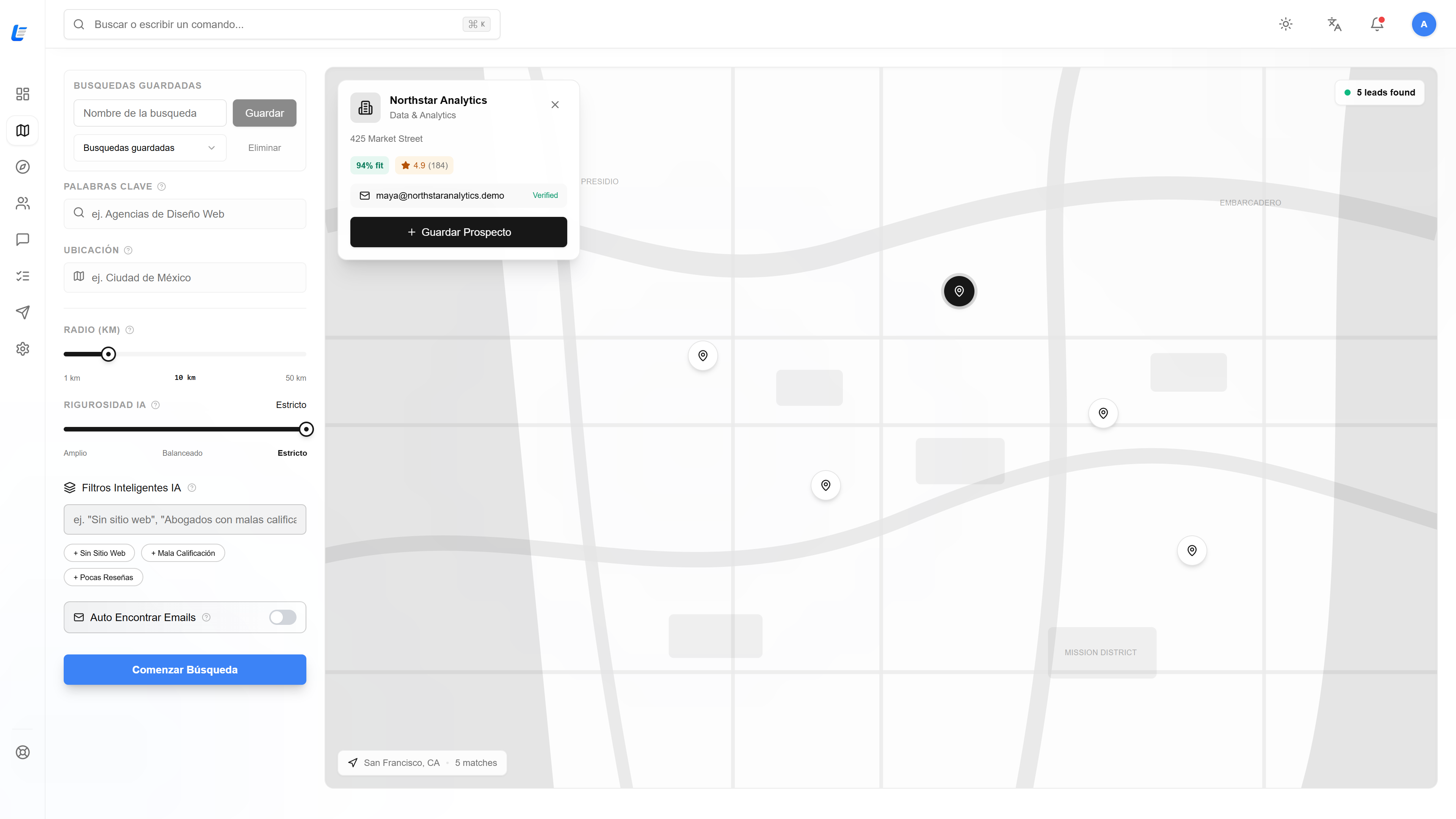
Leadesse, our AI prospecting platform, is built on tasks that narrow. The source does not promise to "find customers": it searches for companies by keyword, location and radius, and explains how well each fits those criteria. Esser, the assistant, does not "run sales": it compares segments or prepares an action from the pipeline. The more concrete the task, the easier it is to say whether it went right.
The Leadesse screens we show are the demo, with sample data, and this article presents no measurements or tests run on the product. We use it to show design decisions that make evaluation possible, not results.
An output that can be reviewed
An AI that returns only an answer forces the reviewer to redo the work to find out whether it was right. An AI that returns the answer and its reason can be judged in seconds.
In the Leadesse source, each result shows its fit before it is saved: how closely it matches the search, its public rating and whether its email is verified. There is also an AI strictness control, from broad to strict. The person sees why a company made the list and can move the bar if the list does not convince them.
It is what we say on our automation page: every output carries a reason the team can inspect. For evaluation, that reason is gold. It separates a right answer for a good reason from a lucky one, and a judgement error from a data error.
How do you evaluate an AI feature before automating?
With a file of real, difficult cases, each with the answer the team considers correct, a set of errors agreed in advance as unacceptable, and a group of examples held back to check every change. Start with no external effects, move to supervised use where a person decides, and only then widen autonomy for the part that has shown it is ready.
Start with what makes you read twice
Ask the team for the messages they struggle with. If they come from real conversations, use them with permission and strip out any personal data that is not needed. Fictional examples that keep the difficulty work too. Next to the clear requests, include missing context, several intentions, misspellings and requests that are out of scope.
Fictional input:
"Thursday's no good for me. Could you come on Friday?
Also, how much would it cost to check another office?"

Expected:
Separate the visit change from the new enquiry.
Do not create a booking.
Ask for the existing visit's reference.
The expected output does not have to be an exact sentence. What matters here is keeping both intentions, noticing the missing reference and not doing anything that has not been authorised yet.
The sample call on our automation page is a hard case in miniature. Someone asks for a table for four on Friday, the voice agent offers two times, and then the detail that changes everything arrives: one of the party is coeliac. The agent does not improvise an answer about the kitchen; it notes it and passes the call to a person.
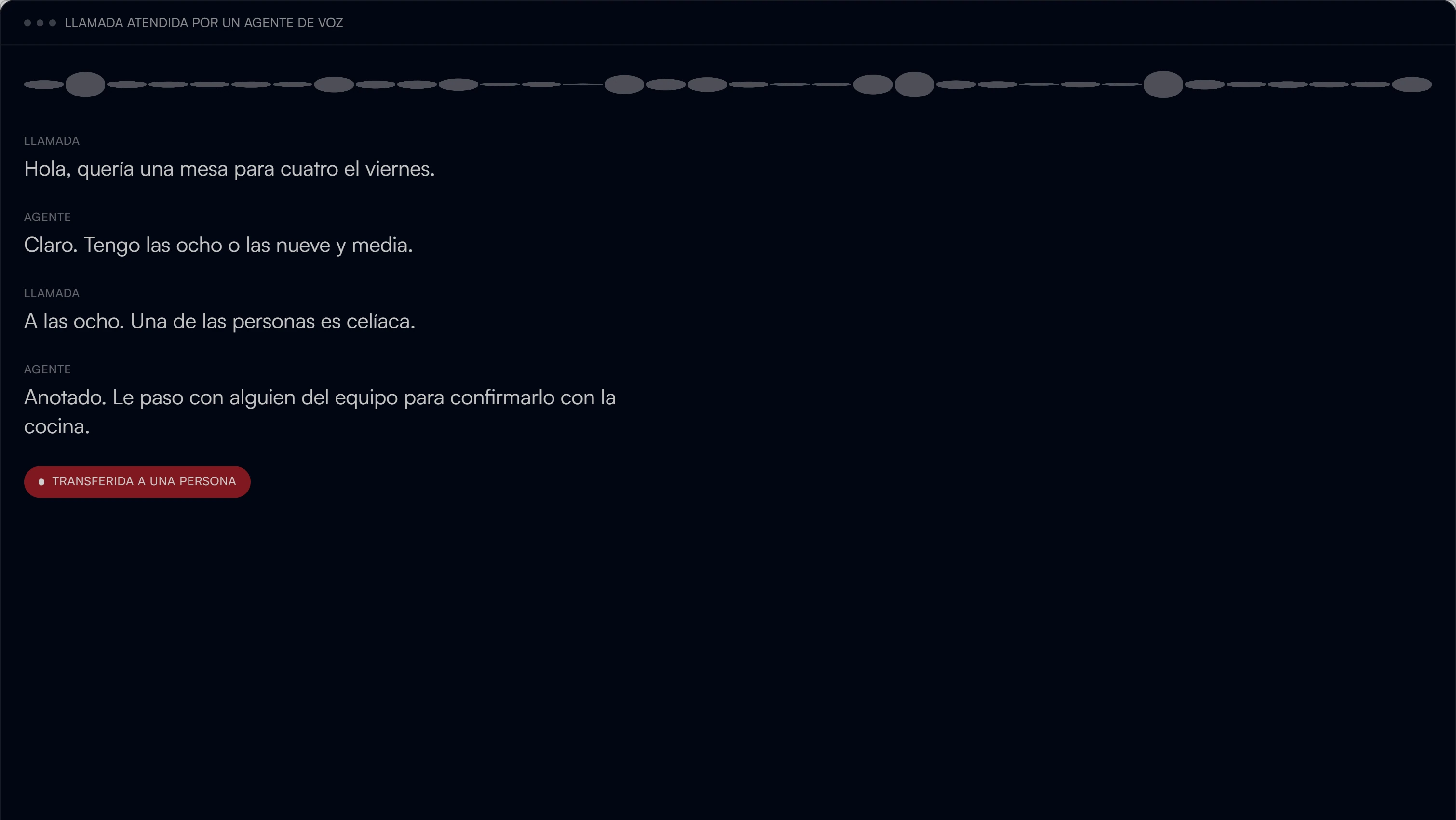
In a case file, that conversation would be one row with a clear expected output: take the booking, note the requirement, confirm nothing about the food and hand over. A friendly "no problem" would be the worst possible error, however much better it sounded.
Decide which errors stop the work
An overlong summary and an invented booking do not cost the same. Before counting successes, decide which failures are tolerable, which need review and which rule the feature out:
- Omitted information: the output ignores a relevant part of the request.
- Invented information: it adds a date, a price or a detail that was not available.
- Out-of-scope action: it proposes something that still needs authorisation.
- Wrong routing: it treats as routine a request the team needs to see.
The categories are for arguing the specific case; they are not a standard or a safety score. Another business will have other consequences. What matters is writing them down before seeing the results, so the bar does not bend to fit what the AI did.
Hold examples back to check changes
If you correct the instructions while looking at the same cases every time, you end up tuning the feature to those cases. Keep one group to work with and another used only to check each candidate version, and note which instructions and configuration produced each output.
We work this way on this site, although what we check is not AI. When an animation cuts a headline into lines, a test reads each cut against the lines the browser hands back afterwards, across 28 routes at 14 screen widths. When we touch something that could affect those cuts, we run it again in full. It is a fixed set of cases that has to keep passing, which is exactly what an AI feature needs whenever its instructions or its provider change.
The set grows with what use teaches. When a new failure turns up during supervised use, it goes in with its context and its expected output. There is no magic number of examples; there are cases that cover the task and its errors.
Test where it is really used
A case file can pass in full and the feature still fail, if it was tested in conditions unlike the real ones. It happened to us with something that has nothing to do with AI, and the lesson is the same.
On our work page, the pointer leaves a trail of smoke over the dark ground. One day we learned that on a particular screen the trail only showed behind the crystals. Every capture we had showed it fine. A browser launched with a wide-gamut display's colour profile showed it exactly as that screen did: light added with no alpha beneath it, which a plain output adds anyway and a colour-managed one throws away.

Since then, everything drawn by adding light is checked both ways. For AI, the equivalent is testing with the messages that actually arrive, through the channel they actually arrive by: typos, transcribed voice notes, attachments and odd hours. The sample log on our automation page ends on exactly that: "exception: outside hours", "handed to a person". The full story of the trail is in the crystals on our work page.
Raise responsibility in stages
Before judging the AI, ask two people to resolve the hard cases. If they disagree, a business rule may be missing, and automating that ambiguity does not settle it. And if the tool returns a confidence figure, do not treat it as a probability of being right until you have compared it with observed results.
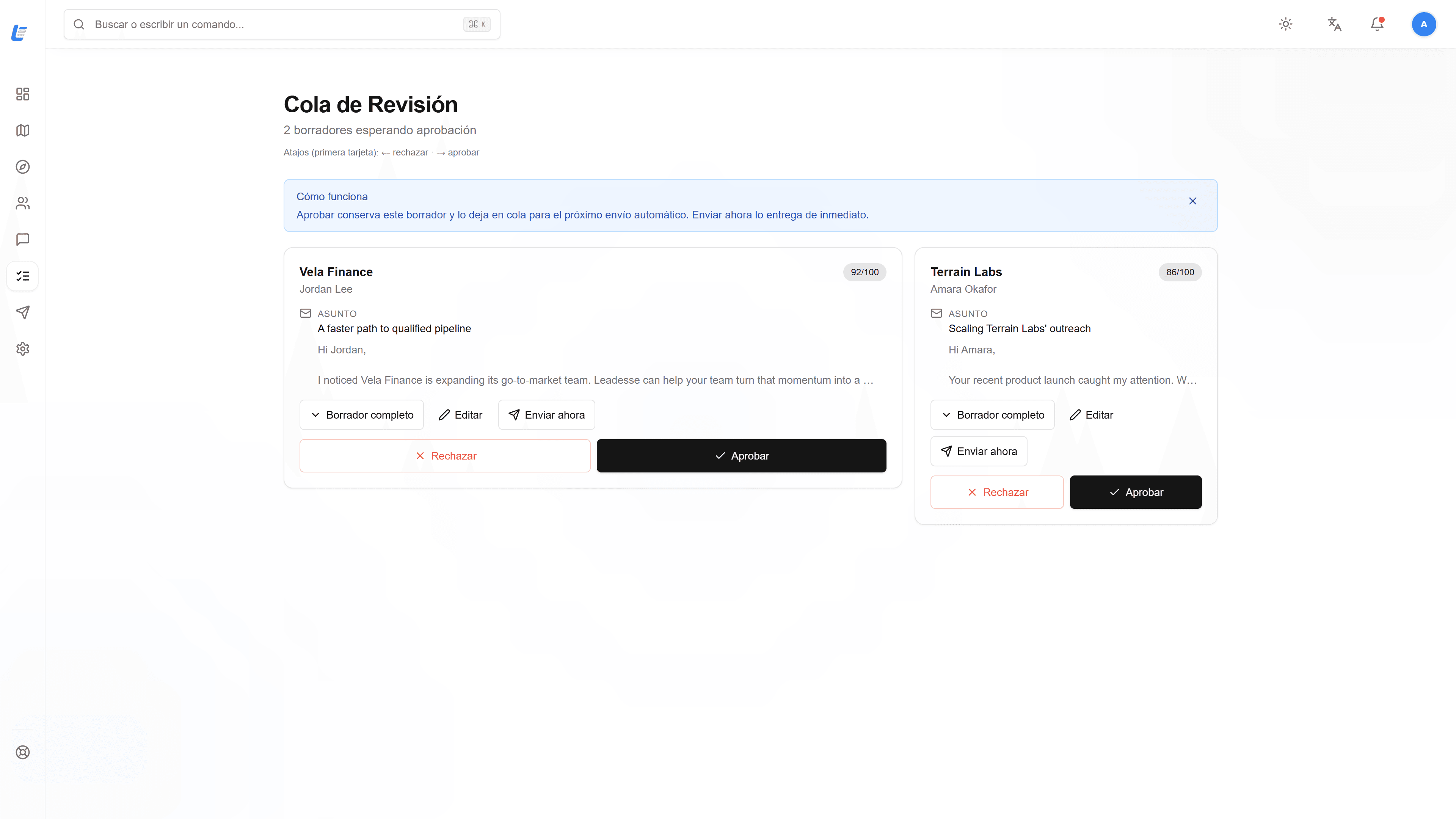
After that, responsibility grows one step at a time. It is how we work on automation: we start with one contained flow and test it on real cases before connecting it to the tools already in place. And in Leadesse the supervised step is not a phase that gets removed: it is the review queue, where every draft arrives with its score and a person approves, edits or rejects it.
- Run the cases with no external effects and review the outputs against written criteria.
- Check the candidate version against the held-out examples.
- Try it in a supervised flow, with a human decision before any action.
- Log corrections and unnecessary reviews, not only successes.
- Decide which failures would halt the rollout or send you back to the previous version.
- Run the whole set again when the instructions, the configuration or the provider change.
The useful outcome may be that the feature still needs review on every case, or that one small, well-defined part is ready for more autonomy. Why review sits at the centre of Leadesse is in Leadesse and human review, and which processes to automate first is in what to automate first. Once the AI acts on other systems, retries carry risks of their own: they are in the automation that sends twice.
Related projects and insights
If you already have an AI feature in mind, tell us which requests your team finds hardest. They are the best place to start defining the brief.
FAQ
How many examples do you need to evaluate an AI?
No number guarantees quality on its own. The set has to cover the task and its relevant errors, grow with the cases that turn up in use, and keep some examples back to check each change.
Does a good evaluation mean human review can go?
Not automatically. It depends on the failures observed, their consequences and the limits of the task. Some operations should keep going through a person, like every message that leaves Leadesse.
Why should an AI explain its answer?
Because the reason lets you judge the output without redoing the work, and tells a right answer for a good reason from a lucky one. In Leadesse every search result shows how it fits the criteria before it is saved.
What is a held-out set of examples?
A group of cases never used to tune the instructions, only to check each candidate version. It stops the feature being tuned to the examples the team looked at while correcting it.
Do you need to re-run the evaluation when you change AI provider?
Yes. A change of model, instructions or configuration can improve some cases and break others. The whole set is run again before the new version is accepted.